FONN
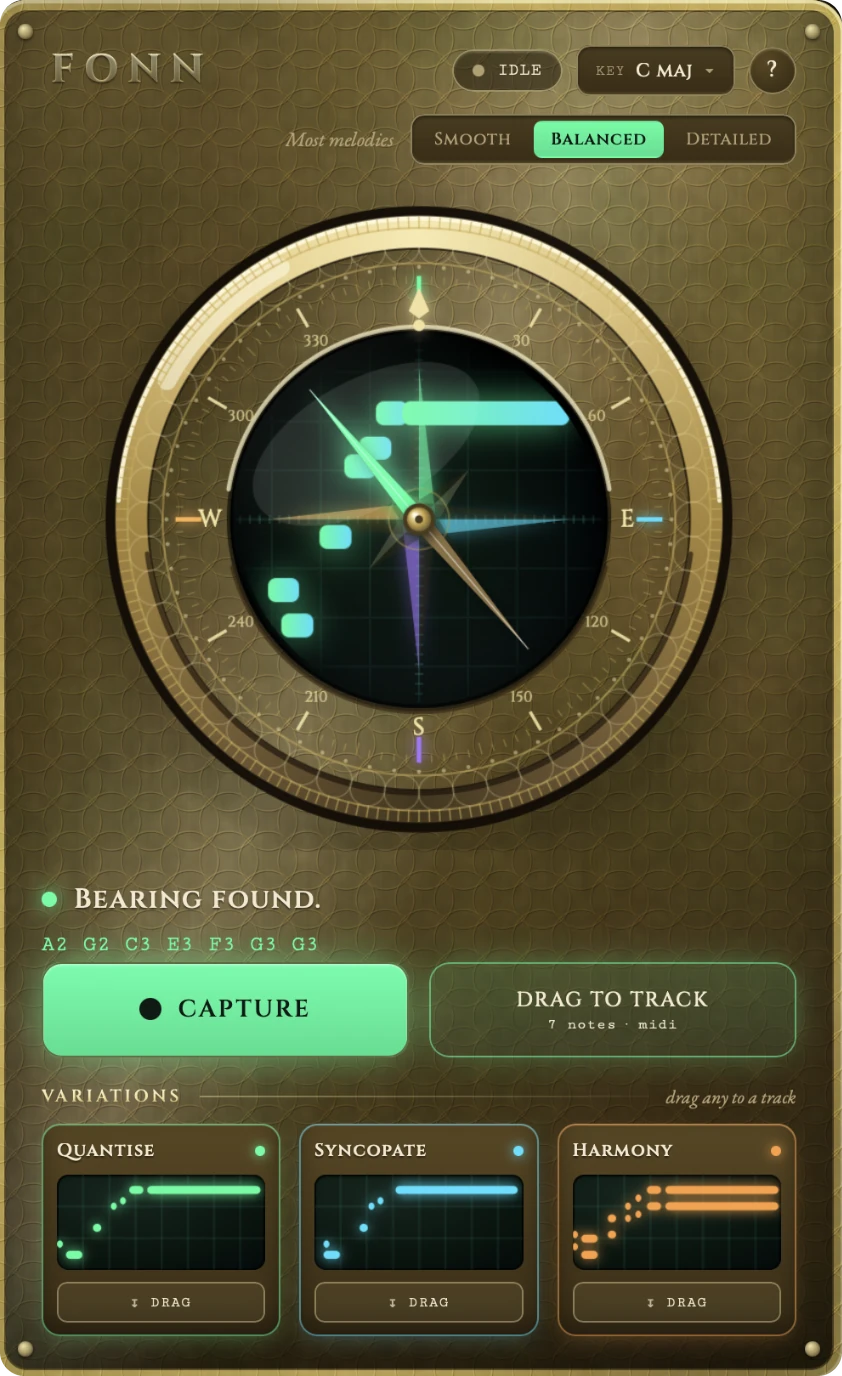
BEARING FOUND. A2 C#3 D3 F#3 E3
The tune’s already in your head. Fonn writes it down.
Hum a melody. Get MIDI in Logic Pro. No keyboard skills required.
One-time purchase · Audio Unit for Logic Pro · Apple silicon & Intel
Why Fonn
You’ve got the tune. Getting it out is the hard part.
You can hear exactly how it goes. But writing it down means hunting for notes on a keyboard you don’t really play, and by the time you’ve found the third one, you’ve lost the feel of it.
Fonn skips that part. Hum the line, drag the MIDI into your project, keep writing.
How it works
From hum to MIDI in about the time it took to hum it.
-
Hum your idea
Load Fonn on an audio track in Logic, press Capture, and hum, sing or whistle the line.
-
Fonn writes it down
It finds each note and its timing, snaps them to your key, and shows the result on the dial.
-
Drag it into Logic
Drag the MIDI onto any software instrument track and press play. No exporting, no file juggling.
See it work
One hum, start to finish.
44 seconds, recorded in Logic Pro. Sound on.
Harmony
Hum one line, get two.
Fonn’s Harmony variation adds a second voice above your melody, in key. It’s something you can’t hum yourself.
Drag it in alongside your original and the idea’s already arranged.
YOUR HUMHARMONY · A MAJOR
What else it does
Built for writing, not fiddling.
Hum, don’t play
Sing, hum or whistle. Fonn listens and writes it out as notes.
In your key
Pick a key and Fonn snaps the transcription to it. Or choose Chromatic for exactly what you sang.
Two more variations
A quantised version tightens the timing to the grid. A syncopated one pushes notes off the beat for groove.
Drag straight into Logic
No routing, no export dialogs, no file management. Drag the card onto a track and it’s there.
Three levels of detail
Smooth for long, flowing lines. Balanced for most melodies. Detailed for fast runs and small steps. Switch and Fonn re-reads the same take.
Stays on your Mac
Your audio is processed on your Mac and never uploaded. The plugin collects no usage data.
Getting the best results
Three habits for clean takes.
Record at a healthy level
Use the input gain on your audio track, not the volume fader, and aim for peaks around −12 dB without clipping. If a take is too quiet, Fonn will tell you.
Give fast notes an edge
Hum “da” or “dum” rather than “la”. The harder consonant marks where each note starts, so quick passages come through cleaner. Leave a small gap between repeated notes.
Match the setting to the line
If quick notes run together, switch to Detailed. If a held note breaks into pieces, try Smooth.
Pricing
Pay once. Keep it.
Fonn for Logic Pro
$49one time
- No subscription, ever
- Install on up to three Macs
- All version 1 updates included
- Everything you make is yours, commercial releases included
- Full refund within 14 days, no questions asked
Fonn is launching soon. Checkout will be handled by Lemon Squeezy, who handle payment, tax and your receipt. Requires macOS 11 or later and Logic Pro.
FAQs
Questions, answered.
What do I need?
Is it a subscription?
How many computers can I install it on?
Can I release music made with Fonn?
What if it doesn’t work for me?
Does it work in other DAWs?
Are my recordings uploaded anywhere?
Do updates cost extra?
Hum it before you lose it.
$49, once. Works in Logic Pro on Apple silicon and Intel Macs.
Launching soon